
Activation and installation from the Playstation Store (PSN)
The purchased product will be downloaded and installed based on the activation code(s) that you will receive by email after placing your order in our store. The download is made from the game manufacturers' platforms or those authorized by them.
ATTENTION! Check the product title to see if it is intended for the equipment Playstation PS3/4/5, etc.
ROMANIAN
Console
- Log in or create a Sony Network Entertainment account on PSN.
- Select PlayStation ® Store icon on the PS4™ system Home screen .
- In the PlayStation ® Store, select Redeem Codes at the bottom of the menu.
- Enter the code.
- Once the code has been entered correctly, select Continue .
- Select I confirm to accept the Trial Code Terms of Service.
- Select Continue to complete code activation.
Please note that the code must be entered exactly as you received it, with uppercase and lowercase letters.
From Browser
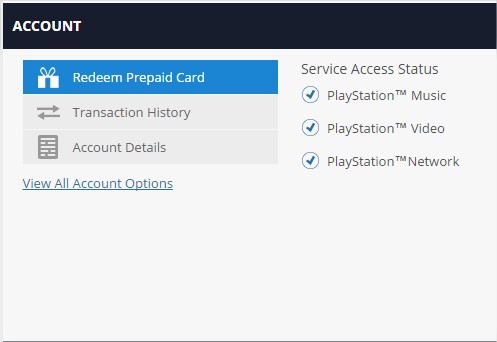
- Go to http://account.sonyentertainmentnetwork.com.
- Log in or create a Sony Network Entertainment account on PSN.
- Select Redeem Prepaid Card
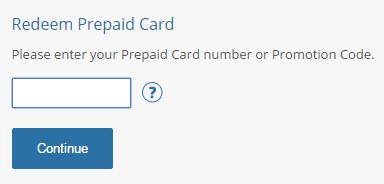
- Enter the code and press continuity
CAREFUL!
Activation: the CD key is activated using the PSN platform and instructions are sent via email.
The product name also specifies the area in which the code can be activated and your PSN account must be declared in that area:
- Worldwide - anywhere in the world
- ROW - activation anywhere in the world with a few exceptions. Ask via chat or phone to confirm that it can be activated in your country.
- EU - European Union
- EMEA - Europe, Middle East and Africa
- US or NA - United States
- ASIA - Asia
- PL - Poland
- RU - Russia
- etc.
Payment method: online by card, bank transfer or upon delivery
Compliance: the code is valid/unused, having been extracted from the card/label in the original packaging or purchased as such.
Return policy: Original CD Key - delivered in 100% legal conditions and cannot be replaced/returned after use/sent via email.
About the content: the product does not include a manual, CD/DVD, box, card or any other physical element.
ENGLISH
PS4 Console Steps
- Open a Sony Network Entertainment account on PSN (or use your existing Sony Entertainment Network account).
- Select the PlayStation® Store icon on the PS4™ system home screen.
- On PlayStation ® Store, select Redeem Codes at the bottom of the menu.
- Enter the code.
- Once the code has been entered correctly, select Continue on the dialog box.
- Select I confirm to accept the Trial Code Terms of Service.
- Select Continue to complete code redemption.
Please note that the code is case sensitive and must be entered exactly as displayed.
Web Browser Steps
- Go to http://account.sonyentertainmentnetwork.com.
- Create a Sony Entertainment Network account (or log in using an existing Sony Entertainment Network or PlayStation ® Network account).
- Select Redeem Prepaid Card
- Enter code and click continuity
ATTENTION!
Activation: the cd key is activated using the PSN platform and instructions are sent via email.
The product name also specifies the area where the code can be activated and your PSN account must be declared in that area:
- Worldwide - anywhere in the world
- ROW - anywhere in the world with some exceptions. Ask on chat or via phone to check if it can be redeemed in your country.
- EU - European Union
- EMEA - Europe, Middle East and Africa
- US or NA - United States
- ASIA - Asia
- PL - Poland
- RU - Russia
- etc.
Payment method: online by card, bank transfer or upon delivery
Conformity: the key is valid/unused being extracted from the original package's label or it is bought as delivered from a 3rd party.
Return Policy: Original CD Key - delivered under 100% legal conditions and cannot be replaced/returned after use/e-mail transmission.
About content: The product does not include manual, cd/dvd, box, card or any other physical element.